
Run Permafrost in your own environment.
Identity attack surface management for Microsoft, AWS and GCP clouds. Your identity data, findings, reports and cloud credentials stay in your environment. Microsoft collection is available first. AWS and GCP collection is coming.
Built for security engineers and cloud architects running Microsoft 365, Entra ID and Azure.
Microsoft Entra ID, Azure and Microsoft 365 · Live today · AWS and GCP: Coming soon
Docker Compose or Kubernetes · Your environment
How scoring worksRead-only OAuth · No stored credentials with workload identity federation · Zero standing write access
Choose how to run it
The same identity analysis, with different responsibilities for data and access.
Self-hosted
- Run in your environment with Docker Compose or one Helm chart.
- Identity data, findings, reports and cloud credentials stay with you.
- Your own app registration. No third-party app with standing directory access.
- At activation and every six hours on schedule, the install sends its licence key, install ID and app version. Scheduled checks also send human and non-human identity counts. The licensing service sees the source IP and stores a salted hash for abuse control when IP hashing is configured.
- You own backups, upgrades and the database.
Hosted
- Permafrost runs the application and database.
- Your identity data, findings and reports are stored in our hosting region.
- Our systems can read your directory whenever your grant is active.
- Three sign-in methods have different credential risks.
- You rely on our hosting and database providers.
Six questions your leadership will ask.
Connect your permission posture to the decisions your leadership makes. Start with principal scores, supporting evidence and a clear record of remediation.
What risk are we carrying right now?
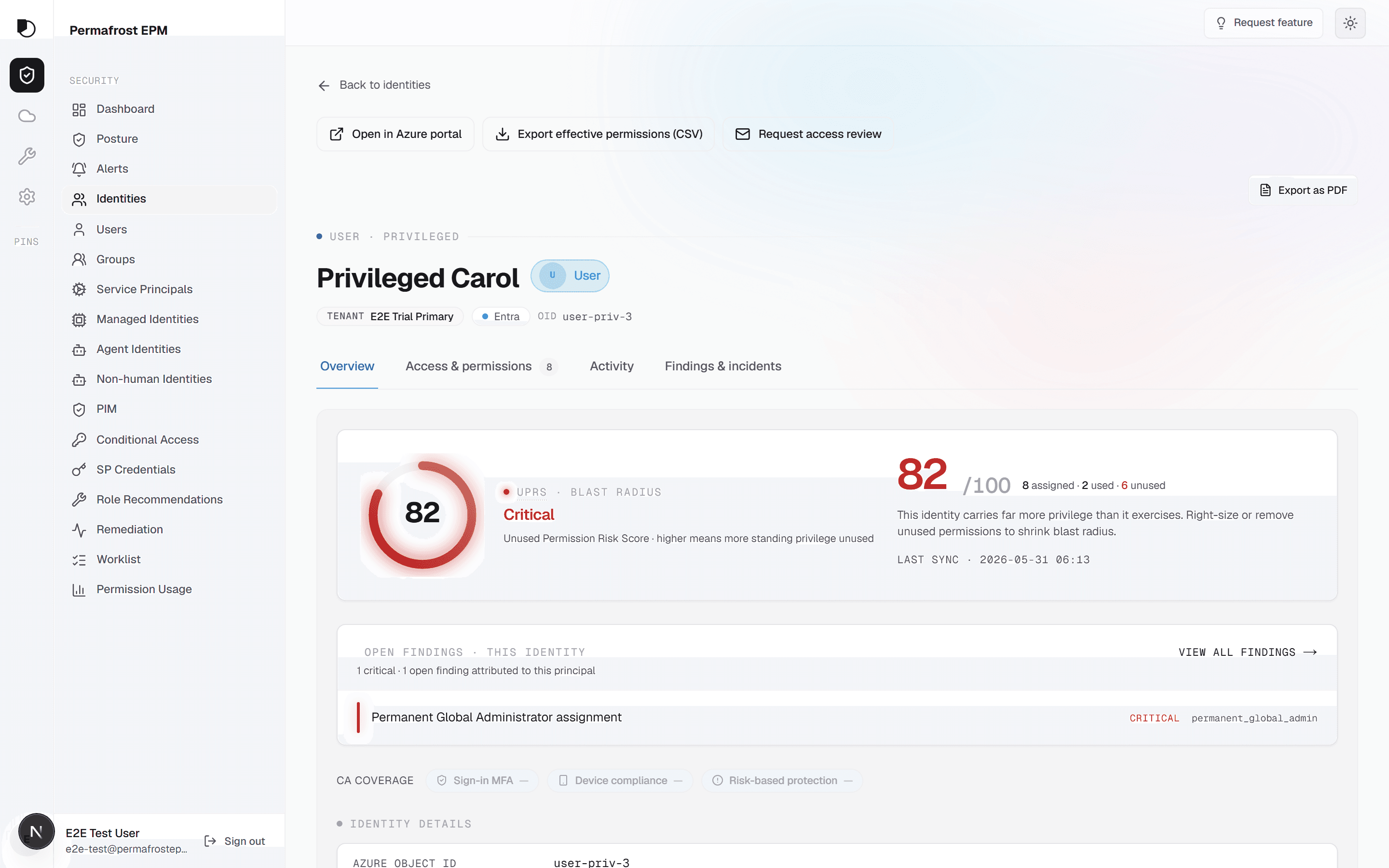
See a 0–100 risk score for each principal, with the contributing posture factors, activity signals and open findings.
How exposed are we at the next audit?
Export findings, collected evidence and remediation history. Give your audit team a record of the access identified and the actions taken.
Where should we reduce access first?
Rank human and non-human identities by risk. Inspect broad role assignments, dormant privileged accounts and excessive application permissions.
How much operational effort does this take?
Start with a finding and its evidence. Use a manual playbook, a downloadable script or a delegated action for supported changes.
What can we show our cyber-insurance provider?
Document your permission posture with principal scores, findings and remediation records. Use the Trust Center for security and procurement answers.
Can we automate our compliance evidence?
Export findings and remediation history through scoped APIs. Send alert timelines to your SIEM for analysis alongside your security events.
The board-level view in four numbers.
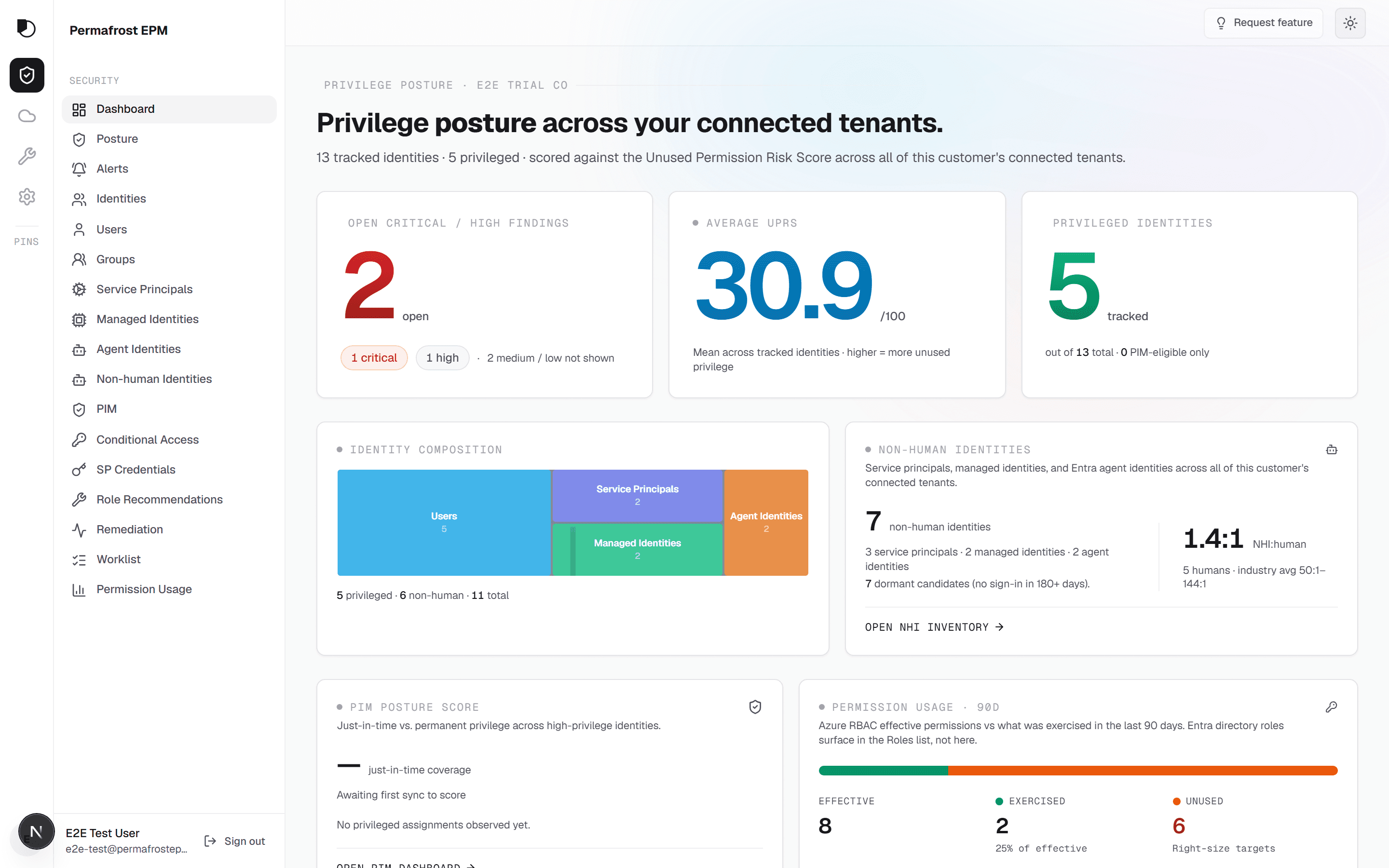
See your identity inventory, non-human identities, ranked findings and tenant risk score. Open each view to investigate.
Sample data
Less standing access. Smaller blast radius.
Find the assignments behind your exposure. Compare granted access with observed activity, inspect the configuration and choose the next change from the finding.
Before: Fragmented access data
- Permissions granted at project start and never revisited.
- Access reviews require reconciling assignments and activity.
- Human and non-human access sits in separate inventories.
- An auditor's request to prove least privilege lands as a fire drill.
After: Access and evidence together
- Principal scores combine posture, activity signals and open findings.
- Assignments and observed activity are available together.
- Non-human identities ranked alongside users, classified by origin.
- Findings and remediation records are ready to export.
Put agent identities in your access inventory.
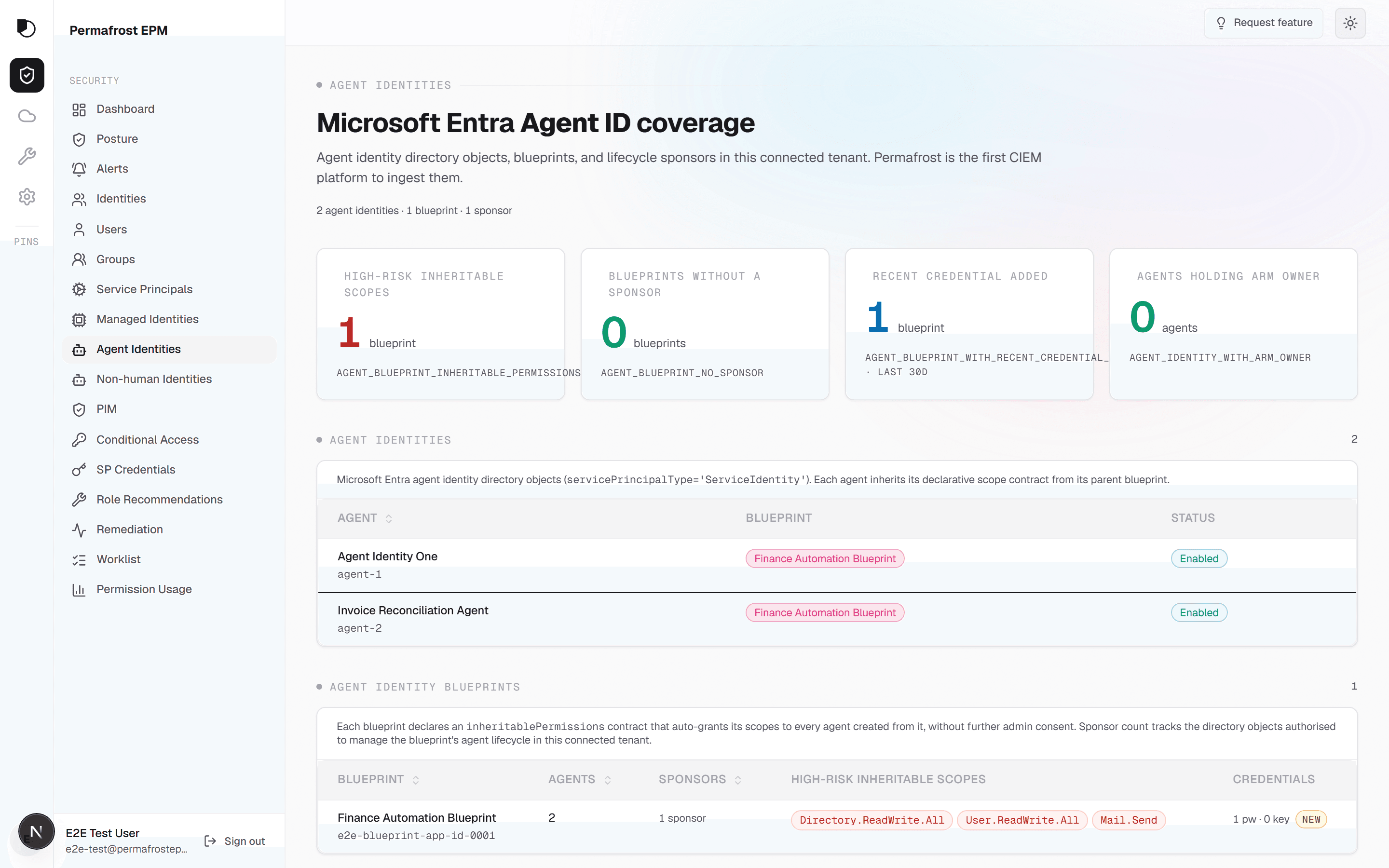
See your collected Entra agent identities alongside users, service principals and managed identities. Inspect their origin, assigned access and risk score. Open an agent blueprint to see the resources and actions within reach.
Evidence for audit and insurance.
Give auditors and underwriters a record of your permission posture. Export findings and remediation history, with the evidence behind your access decisions.
Compliance: Evidence, generated
Evidence for your next audit
Export the assignments, findings and remediation records behind your access decisions. Keep a record of the evidence and the changes your team approved.
Insurance: Posture you can attest
Permission posture you can document
Use principal scores, collected evidence and remediation history to support your access-governance answers. Find the authentication and data-handling details in the Trust Center.
One identity attack surface, three clouds.
Live today for Microsoft Entra ID, Azure and Microsoft 365. AWS and GCP are coming soon, with federated access designed around each cloud’s trust model.
Microsoft Cloud
Map Entra ID identities, Azure RBAC assignments and Microsoft 365 permissions. Compare configuration and collected activity in one inventory.
AWS
You will see IAM users, roles and policy attachments through a cross-account role, with no stored access keys. Coming soon.
Google Cloud
You will see IAM principals and role bindings across the resource hierarchy through workload identity federation, with no downloaded key. Coming soon.
Built to sit alongside your Microsoft security stack.
Add principal risk scores and permission-gap analysis to your Microsoft security stack. Connect findings to the governance and privileged access controls you already use.
| Tool you own | Relationship | What Permafrost adds |
|---|---|---|
| Microsoft Defender for CloudCSPMResource-configuration posture: misconfig, exposure, and compliance benchmarks across the resource plane. | Complementary | The identity plane Defender does not score: granted-versus-exercised permission risk per principal, evidenced by the ARM activity log. |
| Microsoft Entra ID GovernanceIdentity governanceAccess reviews, entitlement management, and joiner-mover-leaver lifecycle across Entra ID. | Overlap | Used-versus-granted evidence for every review decision, plus Azure RBAC depth and non-human identities a review campaign rarely reaches. |
| Microsoft PIMPrivileged accessJust-in-time elevation and approval gates for eligible privileged roles. | Complementary | PIM-aware scoring that reads eligible and active assignments as separate signals, so a JIT elevation is never mistaken for standing access. |
- Microsoft Defender for CloudCSPMComplementary
Resource-configuration posture: misconfig, exposure, and compliance benchmarks across the resource plane.
Permafrost adds The identity plane Defender does not score: granted-versus-exercised permission risk per principal, evidenced by the ARM activity log.
- Microsoft Entra ID GovernanceIdentity governanceOverlap
Access reviews, entitlement management, and joiner-mover-leaver lifecycle across Entra ID.
Permafrost adds Used-versus-granted evidence for every review decision, plus Azure RBAC depth and non-human identities a review campaign rarely reaches.
- Microsoft PIMPrivileged accessComplementary
Just-in-time elevation and approval gates for eligible privileged roles.
Permafrost adds PIM-aware scoring that reads eligible and active assignments as separate signals, so a JIT elevation is never mistaken for standing access.
Trust: Verifiable, not asserted
Find the authentication model, data-processing agreement and sub-processor list in the Trust Center.
From inventory to action.
Explore the inventory, inspect a principal’s score and open the findings behind it. Choose a remediation path for the access you want to change.
The gap, on one screen.
Coverage by identity class, the per-principal risk waterfall, and standing access for an agent identity. The same surfaces a connected tenant lands on.
Explore the product workflow.
The product tour is coming soon. Try the live demo to explore principal scores, finding evidence and remediation options.
Product demo
A short product walkthrough is in production.
Until it lands, take the same surfaces for a spin in the live demo — read-only, synthetic data, no sign-in.
Try the live demoOne score. The factors behind it.
Unified Principal Risk (UPR) is a composite score from 0 to 100. It combines collected posture and activity signals with open findings so you can prioritize the identities that need action.
- Window90-day Azure control-plane analysis window.
- EvidenceCollected activity logs and configuration, attached to findings.
- ScopeUPR combines privilege, permission creep, scope, dormancy, sensitive permissions, PIM, Conditional Access, account state, risk signals, and open findings.
- TenantTenant UPR weights principal scores by blast radius, excludes groups and adds a capped contribution from open tenant findings.
Human, workload and agent identities.
Sample data
Class: Human
Employees and guests with Entra ID accounts, sign-in activity, role assignments and posture scores.
Class: Service principal
Application and automation identities with their permissions, credential metadata and origin.
Class: Managed identity
System-assigned and user-assigned identities with their Azure role assignments and observed activity.
Class: Agent identity
AI agents acting under their own credentials. A new class with an old problem: standing over-grant.
Severity you can defend.
Activity-based findings cite collected Azure activity-log evidence; configuration findings cite the collected configuration.
- DrillOpen a finding to inspect the principal, assignment and evidence.
- ProofAssignment scope, principal context and the supporting evidence.
Sample data
CriticalYour change. Your execution path.
Choose from the modes supported by your finding: follow a playbook, run a script or authorize an in-product action. You control the change and the credentials used to make it.
Mode 01: Manual
Guided steps
A precise, scoped runbook for the change: the exact role assignment, the exact scope, the portal path. You stay on the keyboard the whole time.
Mode 02: Script with preview
Download, review, run
Inspect every command before download. Compare the generated script with your change plan, then run it from your own shell under your own account.
Mode 03: Session-only OAuth
Apply in one session
Authorize a supported action with a delegated OAuth session. Your sign-in travels in a sealed session only the server can open. Permafrost accepts it once within ten minutes and stores no credential.
Isolation
Per-customer isolation. Your inventory, findings and exports stay within your customer boundary.
Scope
CIEM for Microsoft Cloud. Compare entitlements with observed activity and inspect the configuration behind each finding.
Cadence
Scheduled syncs refresh your connected tenant’s inventory, activity and findings.
Take a core sample.
Keep identity data and cloud credentials in your environment.
Demo is read-only · synthetic data · no sign-in
A DuneCodeForge product.